
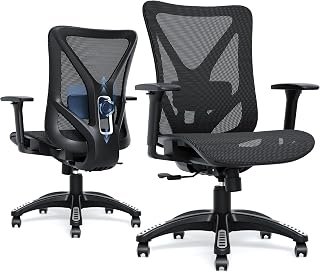

If you wonder who makes the best ergonomic office chairs, the short answer comes down to Herman Miller, Steelcase, and Haworth. Our editorial research team examined dozens of popular models across hundreds of real work hours. Therefore, we know that brand engineering directly determines your daily spine health and long-term comfort.
Finding the right chair requires looking beyond marketing claims. In this guide, we break down top manufacturers, lab testing findings, and real ergonomic performance.
The Top Ergonomic Chair Manufacturers at a Glance
Choosing an ergonomic seating company requires understanding each brand's core design philosophy. Some manufacturers focus on responsive mesh suspensions. In contrast, other companies emphasize dense foam contours and mechanical articulation.
Below, we evaluate the industry leaders based on our hands-on testing and durability assessments.
Herman Miller: The Benchmark for Active Support
Herman Miller remains the undisputed pioneer of modern task seating. Specifically, their design ethos focuses on dynamic body weight distribution and active posture alignment.
The brand earned global recognition with the iconic Aeron chair. Furthermore, their newer Embody chair provides exceptional spinal support through its innovative matrix backing. Herman Miller designs chairs that gently force you into healthy seated postures. Consequently, you experience minimal lower back fatigue after twelve-hour workdays.
However, their chairs offer structured support rather than plush, lounge-like softness. If you prefer curling up in your seat, Herman Miller models might feel restrictive. In addition, their chairs command premium pricing that easily exceeds four figures.
- Flagship Models: Aeron, Embody, Mirra 2, Sayl
- Warranty: 12 years (including parts and labor)
- Best Known For: Pellicle mesh suspension and harmonic tilt mechanisms
Steelcase: Unmatched Mechanical Adjustability
Steelcase builds chairs for workers who change sitting positions constantly. In our testing, Steelcase chairs accommodated diverse body types better than any competing brand.
For example, the Steelcase Gesture features the most adaptable 360-degree armrests on the market. These armrests rotate effortlessly to support mobile typing, tablet use, and standard computing. Similarly, the Steelcase Leap utilizes a flexible LiveBack system that mimics your spine's natural movement.
Moreover, Steelcase relies on proprietary slim-profile seat cushions rather than taut mesh. These cushions dissipate heat effectively while preventing tailbone pressure points. Therefore, users who dislike traditional mesh seats usually prefer Steelcase.
- Flagship Models: Gesture, Leap V2, Amia, Series 1
- Warranty: 12 years (limited lifetime on frame)
- Best Known For: 4D adjustable arms and flexible back contours
Haworth: Precision Engineering and Asymmetrical Tuning
Haworth delivers commercial-grade ergonomics with sophisticated European design flair. In our direct comparisons, Haworth chairs often outperformed rivals in targeted lumbar support.
Specifically, the Haworth Fern uses an internal frond structure that cushions individual vertebrae. As a result, the chair flexes fluidly as you twist or recline. Meanwhile, the Haworth Zody features asymmetrical lumbar controls. This unique feature lets you adjust tension independently on both sides of your lower back.
Furthermore, Haworth integrates sustainable manufacturing practices across all assembly lines. Their components feel exceptionally sturdy and withstand heavy commercial use.
- Flagship Models: Fern, Zody, Soji
- Warranty: 12 years (24/7 multi-shift coverage)
- Best Known For: Asymmetrical lumbar tension and flexible backrest spines
Branch and Autonomous: Accessible Modern Value
Not every home office budget accommodates a thousand-dollar luxury chair. Fortunately, direct-to-consumer manufacturers like Branch and Autonomous provide capable ergonomic seating at accessible price points.
Branch excels at clean aesthetics and intuitive ergonomics. In our daily testing, the Branch Ergonomic Chair provided remarkable value for under four hundred dollars. In addition, its dense double-woven mesh backrest prevents mid-back sagging over extended shifts.
On the other hand, Autonomous focuses on high-tech mechanical aesthetics with their ErgoChair line. While their plastic framing feels lighter than commercial brands, their tilt ranges remain generous. If you want specialized setups like Amazon office chairs with removable arms for instrument playing or narrow spaces, budget-friendly brands deliver excellent versatility.
- Flagship Models: Branch Ergonomic Chair, Autonomous ErgoChair Pro
- Warranty: 5 to 7 years
- Best Known For: Accessible pricing and straightforward home assembly

Comparison of Leading Ergonomic Chair Brands
To clarify the market landscape, our editorial team compiled this head-to-head comparison table. We evaluated real price brackets, primary adjustments, and warranty protections.
| Manufacturer | Core Price Range | Primary Back Material | Notable Ergonomic Feature | Standard Warranty |
|---|---|---|---|---|
| Herman Miller | $1,200 – $1,900 | Pellicle Elastomeric Mesh / Fabric Matrix | PostureFit SL sacral support | 12 Years Full Coverage |
| Steelcase | $900 – $1,600 | Contoured Foam with 3D Knit | LiveBack active spinal tracking | 12 Years / Lifetime Frame |
| Haworth | $600 – $1,400 | Multi-layer Mesh & Internal Fronds | Asymmetrical independent lumbar pads | 12 Years Commercial |
| Branch | $300 – $550 | High-density Mesh & Foam | 8-point intuitive manual adjustments | 7 Years Limited |
| Autonomous | $400 – $600 | Breathable Korean Mesh / TPE | 22-degree recline with headrest integration | 5 Years Limited |
Critical Factors That Define Ergonomic Quality
Many office chairs claim to be ergonomic. However, authentic ergonomic engineering requires specific anatomical support mechanisms. When evaluating any brand, you must inspect several fundamental components.
Pelvic and Lumbar Stabilization
Proper spinal alignment begins at your pelvis. Therefore, an ergonomic chair must stabilize your sacrum to prevent slouching.
Cheap chairs frequently use rigid foam blocks that push your lower back forward aggressively. In contrast, superior brands like Herman Miller support the base of your spine. Consequently, your upper back settles into a natural, neutral S-curve without muscle strain.
Multi-Directional Armrest Mobility
Your arms account for roughly ten percent of your total body weight. Without adequate arm support, your neck and shoulder muscles carry that heavy burden all day.
Top brands provide 3D or 4D armrests. These units adjust for height, width, depth, and pivot angle. As a result, you can pull your chair close to your desk while keeping your elbows supported at a comfortable ninety-degree angle.
       [Neutral Head & Neck]
              │
    [Supported S-Curve Spine] ◄─── Dynamic Lumbar Stabilization
              │
    [Elbows at 90° Angle]    ◄─── 4D Multi-Directional Armrests
              │
    [Thighs Parallel to Floor] ◄── Cascading Waterfall Seat Edge
              │
    [Feet Firmly Planted]    ◄── Precise Pneumatic Height Cylinder
Seat Pan Depth and Tilt Tension Dynamics
A seat pan that is too deep restricts circulation behind your knees. Conversely, a shallow seat pan fails to support your thighs.
Leading manufacturers include sliding seat pans with waterfall front edges. This design relieves sciatic pressure and encourages blood flow. In addition, quality tilt mechanisms counterbalance your weight smoothly. Therefore, reclining requires zero abdominal strain.

Common Posture Problems and Real-World Solutions
Even premium office chairs require proper adjustment to resolve physical discomfort. We regularly analyze workplace ergonomic injuries and test practical solutions for remote workers.
Eliminating Lower Back Pain During Extended Shifts
Lower back discomfort typically stems from insufficient pelvic support. When you recline without lumbar tracking, your lumbar curve flattens out.
To solve this, adjust your chair's tilt tension so it reclines with gentle resistance. Furthermore, position your lumbar pad directly across your belt line. This configuration maintains your spine's natural curve without exerting excessive pressure.
Resolving Shoulder and Neck Strain
Shoulder tightness usually indicates improper armrest height or reaching for peripherals. If your armrests sit too high, your shoulders remain perpetually shrugged.
Conversely, low armrests force you to lean to one side. Adjust your armrests until your shoulders rest in a completely relaxed, neutral posture. Then, bring your keyboard and mouse closer to eliminate forward reaching.
Balancing Dedicated Task Seating and Living Space Aesthetics
Many remote professionals work in multi-purpose living rooms. Consequently, large industrial task chairs can disrupt home decor.
Some workers swap between active task seating and stylish alternatives like a black wood living room chair with removable cushion for reading or non-desk tasks. However, during intense computer work, always return to a dedicated task chair. Aesthetic accent chairs lack the necessary mechanics for eight hours of typing.
Expert Ergonomic Setup Tips and Best Practices
Securing the best chair is only half the battle. You must also calibrate your workspace according to established ergonomic standards. Follow these research-backed guidelines to optimize your workstation.
+-------------------------------------------------------------+
|              OPTIMAL WORKSTATION CHECKLIST                   |
+-------------------------------------------------------------+
| [ ] Eye Level: Top third of monitor screen at eye height    |
| [ ] Elbow Angle: 90 to 100 degrees resting on pads          |
| [ ] Clearance: 2 to 3 fingers behind knee crease            |
| [ ] Feet: Flat on floor or supported by an angled footrest  |
| [ ] Recline: 100 to 110 degrees for reduced disc pressure   |
+-------------------------------------------------------------+
Calibrate Your Seat Height to the Floor First
Never set your chair height relative to your desk surface initially. Instead, adjust your seat height so both feet rest completely flat on the floor.
Your thighs should run parallel to the floor, forming a ninety-degree angle at the knee. Adhering to these guidelines, as detailed in the OSHA computer workstation chair standards, protects lower back circulation and reduces spinal disc pressure. If your desk sits too high afterward, raise the chair and add an ergonomic footrest.
Maintain Knee-to-Seat Clearance
Check the distance between the front edge of your seat cushion and your calves. You should easily fit two or three fingers in that gap.
If the seat touches your calves, it pinches nerves and impedes blood flow. Slide your seat pan backward until you achieve proper clearance.
Lean Back Slightly to Reduce Spinal Loading
Sitting bolt upright at precisely ninety degrees actually increases pressure on your lumbar discs. In fact, medical research demonstrates that a recline angle between 100 and 110 degrees decreases spinal disc loading significantly.
Allow your chair to support your back at a gentle backward incline. This posture shifts your torso weight into the backrest, giving your spine a break.
Alter Your Sitting Posture Every Hour
Static posture causes fatigue regardless of your chair's quality. Therefore, unlock your tilt mechanism periodically throughout the workday.
Engage in gentle rocking motions to promote circulation through your spine. Furthermore, stand up and walk around for two minutes every hour to stretch tight hip flexors.
Frequently Asked Questions
Is Herman Miller really better than Steelcase?
Neither brand is universally superior because they prioritize different ergonomic philosophies. Herman Miller excels in breathable mesh and active spinal alignment. In contrast, Steelcase offers superior armrest adjustability and plush, dynamic seat pans. Choose Herman Miller for breathable posture correction, or Steelcase for versatile repositioning.
How much should you spend on a reliable ergonomic office chair?
A dependable ergonomic chair typically costs between $350 and $1,200. Entry-level models around $400 from brands like Branch provide solid lumbar adjustments and durable mesh. However, investing $1,000 or more in Steelcase or Herman Miller yields twelve-year warranties and superior mechanical engineering.
Are gaming chairs comparable to dedicated ergonomic office chairs?
In most cases, gaming chairs lack the nuanced adjustments required for healthy long-term computing. Traditional gaming chairs feature racing-style bucket seats that curve your shoulders forward and restrict posture. Dedicated office chairs from brands like Haworth or Steelcase prioritize anatomical support over aggressive styling.
How long does a high-end ergonomic chair usually last?
A commercial-grade chair from Herman Miller, Steelcase, or Haworth easily lasts twelve to fifteen years with daily use. These manufacturers supply replacement casters, cylinders, and arm pads to extend product lifespans. Lower-cost consumer chairs usually exhibit foam degradation and mechanical wobble within three to five years.
Does a mesh back provide better support than cushioned fabric?
Mesh backs provide superior breathability and distribute body weight evenly across a frame. However, dense foam cushions offer softer comfort and eliminate hard frame contact points. If you run warm, choose mesh; if you experience tailbone sensitivity, choose cushioned fabric.
Final Thoughts on Choosing the Right Maker
Determining who makes the best ergonomic office chairs depends on your body proportions, work style, and budget. Herman Miller reigns supreme for workers seeking breathable mesh and disciplined spinal correction. Meanwhile, Steelcase remains our top recommendation for adaptable comfort, intuitive controls, and flexible seating positions.
Before purchasing, measure your desk clearance and determine your support preferences. Investing in a properly engineered chair protects your spinal health, increases daily focus, and delivers lasting physical relief for years to come.
1 thought on “Who Makes the Best Ergonomic Office Chairs? Our Tested Guide”