
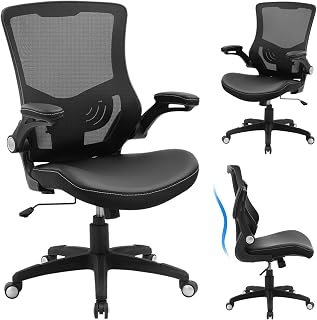

Finding the right seating setup can dramatically transform your daily productivity and physical health. Therefore, understanding what makes a good desk chair is vital before you invest your hard-earned money. Our editorial research team examined dozens of top-rated seats across months of hands-on daily use. Specifically, we tracked spinal alignment, pressure distribution, thermal comfort, and long-term mechanical durability. We discovered that genuine ergonomic support goes far beyond plush cushioning or stylish modern silhouettes. In this guide, we break down the definitive engineering standards and comfort metrics that truly matter.
The Core Ergonomic Pillars of Seating Design
Ergonomics is not just a marketing buzzword used by furniture retailers. Instead, it represents the science of designing equipment to fit the human body efficiently. When a desk chair succeeds ergonomically, it minimizes musculoskeletal strain and promotes healthy blood circulation.
       [ Adjustable Headrest ]
                 |
      [ Dynamic Lumbar Curve ] ---- Supports Lordotic Curve
                 |
      [ 3D / 4D Armrests ] -------- Relieves Neck & Shoulder Load
                 |
   [ Waterfall Seat Cushion ] ----- Preserves Popliteal Circulation
                 |
    [ Class-4 Gas Cylinder ] ------ Maintains Pneumatic Stability
Lumbar Support: Preserving the Lordotic Curve
The human lumbar spine curves naturally inward toward the belly button. Consequently, sitting without adequate lower-back reinforcement causes the pelvis to rotate backward. This slumping posture flattens the natural curve and severely strains spinal discs.
A high-performance chair must provide dedicated, height-adjustable lumbar reinforcement. Ideally, the support should also offer depth adjustment to match your specific spinal depth. During our evaluations, we noticed fixed lumbar bands often sit either too high or too low. In contrast, independent lumbar mechanisms adapt dynamically as you shift postures throughout the workday.
Seat Pan Depth and Waterfall Contours
Seat pan dimensions directly impact lower-body circulation and pelvic stability. If your seat cushion is too deep, the front edge presses against your calves. This constant pressure limits blood flow and can lead to leg numbness over time.
Conversely, a shallow seat pan leaves your thighs unsupported. As a result, your body weight concentrates entirely on your sit bones, causing rapid fatigue. Quality chairs provide an adjustable sliding seat pan with a waterfall front edge. This downward sloping contour relieves pressure behind your knees, protecting vital nerves and blood vessels.
Seat Height and Pelvic Neutrality
Your seat height establishes the mechanical foundation for your entire working posture. Therefore, an adequate pneumatic cylinder must accommodate your specific lower-leg length. When properly adjusted, your feet should rest completely flat on the floor.
At the same time, your knees should form an open angle between 90 and 100 degrees. This precise alignment keeps your pelvis in a neutral orientation. Furthermore, it prevents unnecessary strain across your lower back muscles and hamstring tendons.

Mechanical Adjustability: Fine-Tuning Your Fit
Generic chairs force your body to adapt to rigid, static frames. In contrast, superior task chairs adapt fluidly to your unique personal dimensions. The following engineering mechanisms separate mediocre task seating from genuinely supportive ergonomic equipment.
+------------------------+-----------------------------------+------------------------------------+
| Adjustment Feature     | Poor Quality Standard             | Premium Ergonomic Benchmark        |
+------------------------+-----------------------------------+------------------------------------+
| Tilt Mechanism         | Simple upright lock only          | Multi-angle synchro-tilt mechanism |
| Armrest Articulation   | Fixed or height-only adjustment   | 3D or 4D multi-directional travel  |
| Lumbar System          | Static cushion or plastic ridge   | Height- and depth-tuned support    |
| Seat Pan Adjustment    | Fixed depth bolt-on plate         | Smooth sliding seat pan lever      |
+------------------------+-----------------------------------+------------------------------------+
Synchro-Tilt vs. Traditional Tilt Mechanisms
Basic office chairs use simple center-tilt mechanisms. When you lean back in these budget seats, the front edge rises rapidly. Consequently, your feet lift off the floor, placing severe pressure underneath your thighs.
In contrast, high-end ergonomic designs utilize advanced synchro-tilt mechanisms. As you recline, the backrest and seat pan tilt at a synchronized 2:1 ratio. For every two degrees your back tilts backward, the seat pan shifts downward by one degree. Thus, your feet stay anchored to the floor while your spine opens naturally.
Adjustable Armrests: 3D, 4D, and Beyond
Armrests serve a crucial mechanical purpose by offloading weight from your shoulders and trapezius muscles. However, poorly positioned armrests can actually worsen your posture. If they collide with your desk edge, they force you to hunch forward awkwardly.
To prevent this issue, look for chairs featuring multi-directional arm adjustments. Premium 4D armrests adjust for height, width, forward-and-backward depth, and inward pivot angles. In tight workstations, some professionals choose to modify their setup entirely. If you want to modify your existing workspace, you can review our guide on the best ways to remove an armrest on a chair without damaging your components.
Additionally, you can explore dedicated office chairs with removable arms for maximum desk clearance. These flexible configurations let you slide close to your keyboard tray without obstruction.
       [ 4D Armrest Motion Range ]

         Height (Up / Down)
                 ↕
         Depth (Forward / Back)
                 ↔
         Width (In / Out)
                 ⤡
         Pivot (Angled In / Out)
                 ⤾
Tension Control and Variable Recline Limiting
Dynamic sitting is far healthier than remaining locked into a single posture all day. For this reason, an effective desk chair must feature an intuitive tilt-tension knob. This control calibrates the resistance you feel when pushing against the backrest.
If the tension is too stiff, you will struggle to recline comfortably. On the other hand, loose tension makes you feel as though you are falling backward. A well-designed chair lets you customize this resistance perfectly to match your body weight.
Materials Science: Mesh, Foam, and Long-Term Durability
A desk chair can feature excellent geometry yet still fail due to cheap materials. High-grade components withstand thousands of hours of compression while maintaining structural integrity.
Breathable Elastomeric Mesh vs. High-Density Cold-Cure Foam
Seat materials significantly influence your thermal comfort and pressure management throughout long work sessions. Elastomeric mesh promotes superior airflow, keeping you cool in warm environments. Furthermore, premium composite mesh distributes body weight evenly without creating harsh pressure points.
However, low-cost mesh can sag quickly over months of continuous use. When mesh loses its spring, your tailbone contacts the underlying structural frame.
Alternatively, high-density cold-cure foam offers exceptional longevity and balanced support. Manufacturers produce cold-cure foam inside closed molds, creating a resilient internal cellular structure. As a result, it retains its initial shape and density for many years.
+--------------------+-----------------------------+-----------------------------+
| Material Property  | Elastomeric Mesh            | High-Density Cold-Cure Foam |
+--------------------+-----------------------------+-----------------------------+
| Air Circulation    | Outstanding (Zero heat trap)| Moderate (Requires fabric)  |
| Pressure Relief    | Responsive floating feel    | Dense, contoured absorption |
| Durability Profile | High on premium strands     | Exceptional over 7+ years   |
| Maintenance        | Vacuum-friendly, wipes clean| Requires spot shampooing    |
+--------------------+-----------------------------+-----------------------------+
Frame Architecture, Gas Cylinders, and Wheel Casters
A sturdy foundation ensures safety, smooth movement, and wobble-free stability. Always inspect the rating of the pneumatic gas lift cylinder before buying. You should insist on a certified Class-4 gas cylinder for reliable height adjustments.
Additionally, evaluate the five-star wheelbase construction. Heavy-duty aluminum and reinforced nylon bases easily outperform brittle recycled plastics. Finally, verify that your casters match your specific flooring type. Soft polyurethane wheels protect delicate hardwoods, whereas hard nylon casters glide effortlessly across dense office carpets.

Practical Applications: Choosing Seating for Real Workspaces
Selecting a desk chair requires balancing your physiological profile against your daily workflow. One single chair design cannot fit every human body universally.
             [ Define Your Primary Work Habit ]
                            |
           ------------------------------------
           |                                  |
   [ Task-Heavy Typing ]             [ Mixed Media / Creative ]
           |                                  |
   - Forward-Tilt Priority            - Deep Synchro-Recline
   - Narrow Arm Pivot Range           - 4D Arm Versatility
   - Firm Lumbar Depth                - Breathable Mesh Back
Matching Chair Geometry to Your Unique Body Type
Standard task chairs cater primarily to individuals between 5 feet 5 inches and 6 feet tall. If your stature falls outside this range, standard proportions will feel uncomfortable. Petite users need lower cylinder travel and a shallow seat pan. Otherwise, their feet will dangle and their lower spine will lose contact with the backrest.
Conversely, taller professionals require an extended cylinder and a taller backrest. In addition, they must check the structural weight capacity of the frame. Testing standards certified by organizations like the Business and Institutional Furniture Manufacturers Association (BIFMA) guarantee commercial-grade safety and load limits.
Troubleshooting Common Office Chair Ailments
Poorly fitted chairs generate predictable physical warning signs. By identifying these symptoms early, you can adjust your chair before chronic injury develops:
- Symptom: Sharp tailbone or sacral aching.
Cause: Your seat pan is tilted too far backward, or the foam has compressed completely.
Solution: Increase tilt tension, adjust the seat angle forward, or switch to contoured cold-cure foam. - Symptom: Tingling or numbness in feet and calves.
Cause: The seat pan depth is too long, compressing the popliteal crease behind your knees.
Solution: Slide the seat pan backward to preserve a two-finger gap between the cushion and your calves. - Symptom: Persistent tension across the upper shoulders and neck.
Cause: Your armrests are adjusted too high, forcing your shoulders into a perpetual shrug.
Solution: Lower armrests until your elbows rest at 90 degrees with your shoulder blades fully relaxed.
Expert Recommendations for Workspace Ergonomics
Applying proper ergonomic principles requires adjusting your entire workspace together. Even the best chair cannot compensate for an improperly placed screen or desk.
     Eye Level --------------> [ Top 1/3 of Display ]
                                      |
     Elbows at 90° ----------> [ Keyboard / Mouse Plane ]
                                      |
     Hips at 90-100° --------> [ Neutral Pelvic Base ]
                                      |
     Feet Flat --------------> [ Floor or Footrest Surface ]
- Align to the Desk Plane: First, adjust your seat height so your elbows form a 90-degree angle with your keyboard. If your feet dangle after this step, immediately add an ergonomic footrest underneath.
- Calibrate Your Recline Resistance: Avoid locking your chair completely upright like a rigid wooden stool. Instead, unlock the tilt mechanism and tighten the tension knob. Allow the backrest to cradle your movements dynamically.
- Honor Official Workplace Standards: Follow the workstation guidelines outlined by the Occupational Safety and Health Administration (OSHA) to verify clearance distances.
- Schedule Movement Intervals: Change your sitting posture every thirty minutes. Alternating between an upright focus angle and a supported recline keeps your spinal discs hydrated and healthy.
Frequently Asked Questions
How much should I realistically spend on a quality desk chair?
A dependable ergonomic task chair generally costs between $300 and $800. Entry-level budget chairs under $150 often cut corners on foam density and tilt mechanisms. High-end commercial models exceeding $1,000 provide ten-to-twelve-year warranties, superior materials, and repairable components.
Is a mesh chair better than a leather office chair?
Mesh excels at breathability and heat dissipation during long, warm working days. Leather provides a luxurious aesthetic and wipe-clean convenience, but it traps body heat and promotes sweating. For intense eight-hour workdays, high-grade mesh or breathable wool upholstery generally performs best.
Do I really need a headrest on my desk chair?
Headrests are not strictly necessary for upright typing tasks because your neck muscles should naturally balance your skull. However, if you spend significant time reading documents, attending video calls, or reclining, an adjustable headrest provides welcome cervical support.
How do I know if my desk chair fits me properly?
You should be able to sit with your feet flat on the floor while maintaining a two-finger gap between the seat edge and your knees. Furthermore, the lumbar curve should nestle smoothly into your lower spine without poking your mid-back.
What is the average lifespan of an ergonomic office chair?
A commercial-grade office chair lasts between seven and twelve years when maintained properly. In contrast, inexpensive retail chairs typically deteriorate within two to three years as their hydraulic seals fail and cushions flatten.
Finding Your Ideal Workspace Fit
Ultimately, what makes a good desk chair is its capacity to support your body unobtrusively throughout your workday. It should not draw attention to itself through rigid pressure points, sweltering fabrics, or unstable mechanisms. Instead, superior seating responds seamlessly to your natural movements, offloading weight from vulnerable joints.
Take the time to evaluate your unique proportions, work habits, and desk dimensions before selecting a model. Prioritize chairs with verified mechanical warranties, adaptable 3D or 4D adjustments, and responsive lumbar support. Investing in high-performance seating safeguards your long-term spinal health, enhances focus, and transforms your daily working experience.