
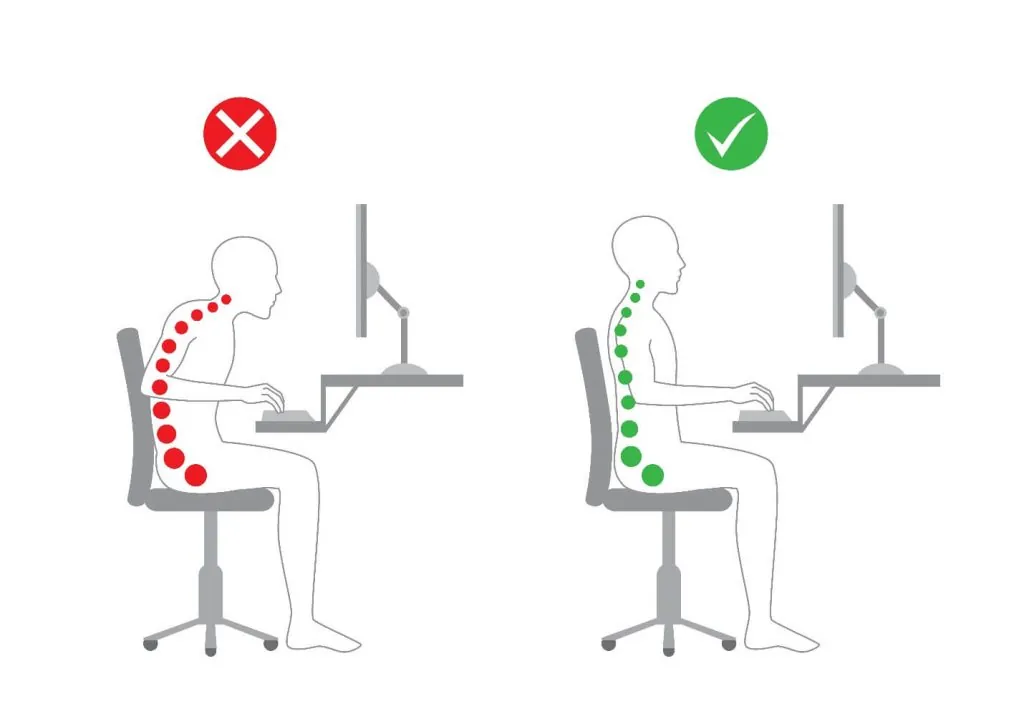
You should keep your feet flat on the floor and your ears aligned with your shoulders to improve your posture and sit with a straight back for better comfort. This process takes about 5 minutes to set up, costs nothing, and is easy to maintain once you adjust your chair.
Tools to keep your back straight
| Item | How much | Why it’s needed | A substitute |
|---|---|---|---|
| Office chair | 1 unit | Provides base support | Sturdy dining chair |
| Lumbar cushion | 1 pillow | Keeps spine curve | Rolled towel |
| Footrest | 1 item | Keeps knees level | Stack of books |
| Desk height | 1 position | Stops shoulder hunch | Adjust seat height |
| Monitor | 1 screen | Prevents neck strain | Laptop stand |
Preparing your workspace
- Clear the surface of your desk so your keyboard sits directly in front of you.
- Move your chair to a position where your feet rest firmly on the ground.
- Remove heavy items from your pockets to keep your hips balanced on the seat.
- Turn off background distractions to focus on your body position for 10 minutes.
- If you have chronic back pain, consult a medical professional before changing your seating habits.
Steps for correct alignment

- Push your hips as far back into the chair as they can go to support your lower spine.
- Place a small, firm pillow behind your lower back to maintain the natural inward curve of your spine.
- Adjust your seat height until your knees are at a 90-degree angle and level with your hips.
- Keep your feet flat on the floor or on a footrest; crossing your legs twists your pelvis.
- Align your ears directly over your shoulders to avoid forward head posture, which strains the neck muscles.
- Position your keyboard so your elbows stay close to your body at a 90-degree angle while typing.
- Set your monitor height so the top third of the screen is at eye level, according to Occupational Safety and Health Administration guidelines.
- Relax your shoulders downward, ensuring they aren’t hunched toward your ears or pulled too far back.
- Stand up and stretch your chest and hip flexors every 30 minutes to reset your body tension.
How to check your posture
You know your position is correct when your ears, shoulders, and hips form a vertical line. If you feel pressure in your lower back or notice your chin poking forward, you need to adjust your setup. A common mistake is leaning too far forward to read the screen, which costs you spinal stability. If you feel tired after 20 minutes, your muscles are still learning; take a break, walk for 1 minute, and try again.
Common seating mistakes
| What happened | Why | What to do |
|---|---|---|
| Shoulders hunched | Tight chest muscles | Roll shoulders back |
| Neck pain | Screen too low | Raise monitor height |
| Feet dangling | Chair too high | Use a footrest |
| Slouching | Weak core muscles | Engage abdominal muscles |
| Leaning left | Uneven weight | Center your hips |
Maintaining good habits
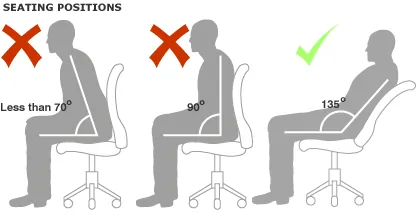
You should practice this alignment every time you sit down to work. Consistency is the key to training your muscles to hold this position naturally.
If you change chairs or desks, you must re-adjust your seat height and monitor position to match your body. Most people make the mistake of keeping their old settings, which causes immediate neck strain or lower back fatigue.
The decision rule is simple: if your elbows fall below the desk surface, raise your chair; if your eyes meet the bottom third of the screen, lower the monitor. Your comfort levels will vary based on your height and the specific design of your office furniture. Check these two points daily until the setup feels automatic, usually within two weeks of dedicated practice.
Frequently asked questions
Can I sit with a straight back for the whole day?
No, you shouldn’t remain in one position for the whole day. You must change your posture every 30 to 60 minutes to prevent muscle stiffness and allow for better blood circulation in your legs.
Why does my back hurt when I sit straight?
Your back hurts because your muscles are tired from holding a new, unfamiliar position. This discomfort usually fades after 7 to 10 days of consistent, short practice sessions while your core muscles gain strength.
How long should I keep my back against the chair?
You should keep your back against the chair for the entire time you’re working at a desk. This contact ensures your spine stays supported and prevents you from sliding into a slumped, rounded position.
Is it safe to use a back brace for posture?
It’s generally not recommended to use a back brace for daily work. You should rely on your own core muscles to maintain alignment, as a brace can make your muscles weaker over time.
What happens if my chair doesn’t have lumbar support?
Your lower spine will likely flatten or round if your chair lacks support. You can easily fix this by placing a small, firm towel roll or a dedicated lumbar pillow behind your lower back.
Does it matter if I wear shoes while sitting?
It matters because shoes provide extra height that changes your knee angle. If you switch between wearing shoes and being barefoot, you must adjust your chair height to ensure your feet stay flat.
Conclusion
Small changes to your daily habits will make a big difference in how you feel. Try setting a gentle alarm on your phone to check your alignment every hour. You’ll find that staying upright doesn’t feel like a chore anymore, and your body will definitely thank you for the extra care.