
Maintaining a straight back while sitting requires a combination of conscious muscular engagement, proper workstation ergonomics, and consistent movement throughout the day. You achieve this by balancing your spine’s natural curves rather than forcing it into a rigid, military-style posture that often leads to fatigue. By adjusting your chair height and monitor placement, you create an environment where staying upright feels like the path of least resistance for your body.
Key Takeaways
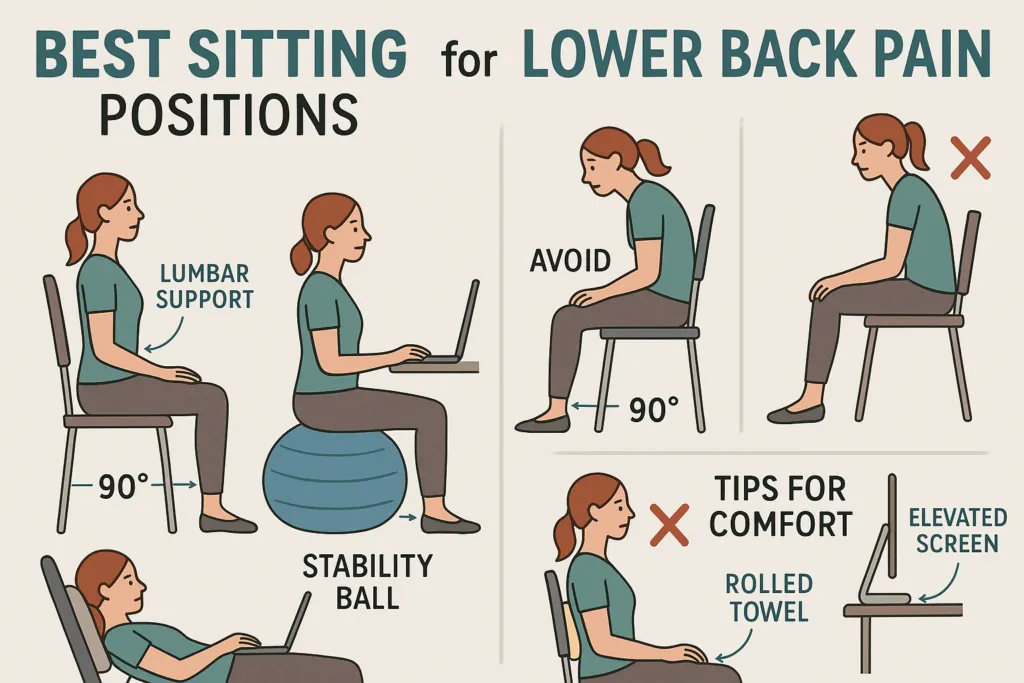
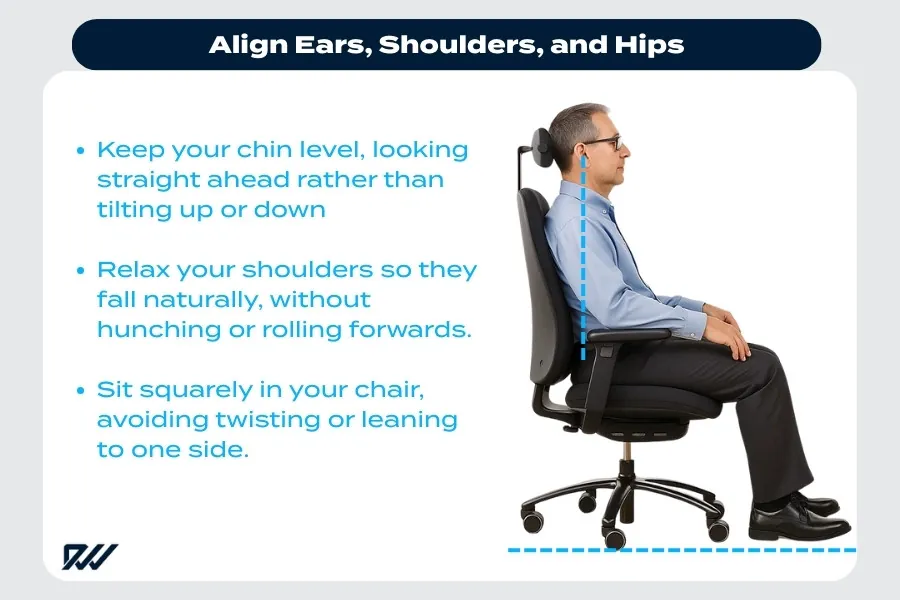
- Align your ears, shoulders, and hips to maintain a neutral spine.
- Use a lumbar support cushion to fill the gap behind your lower back.
- Keep your feet flat on the floor to stabilize your pelvis.
- Take a movement break every thirty minutes to reset your posture.
- Position your screen at eye level to prevent forward head carriage.
How to Keep a Straight Back
To maintain a straight back, focus on the neutral spine position. This means your head sits directly over your shoulders, and your shoulders sit directly over your hips. Avoid slumping by imagining a string pulling the crown of your head toward the ceiling. If you find yourself leaning forward, your chair may be too far from your desk or your monitor may be positioned incorrectly.
Ergonomic Setup Requirements
Your furniture acts as the foundation for your posture. If your chair is too high, your feet will dangle, pulling your pelvis into a tilt that rounds your lower back. If it’s too low, your knees will be higher than your hips, causing you to slump.
| Component | Proper Adjustment |
|---|---|
| Chair Height | Feet flat, knees at 90-degree angle |
| Lumbar Support | Firm pressure against lower back curve |
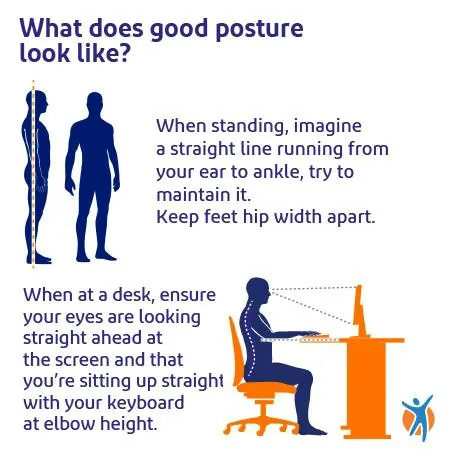
| Monitor Height | Top third of screen at eye level |
| Desk Height | Elbows at 90 degrees while typing |
Essential Strengthening Exercises
Building core muscle endurance is vital for long-term comfort. These exercises target the muscles that support your spine throughout the workday.
- Planks: Hold a straight line from head to heels to engage deep abdominal muscles.
- Bird-Dogs: Extend opposite arm and leg while keeping the back perfectly still.
- Cat-Cow Stretches: Move through spinal flexion and extension to improve mobility.
- Wall Slides: Stand against a wall to reset your shoulder blade alignment.
Managing Your Daily Routine
Consistency is more important than perfection. Incorporate these habits to ensure you don’t slip back into poor habits as the day progresses.
| Frequency | Action Required |
|---|---|
| Every 30 Minutes | Stand up and stretch for one minute |
| Every 60 Minutes | Scan your body for tension in shoulders |
| Every 90 Minutes | Adjust seat height or tilt slightly |
Pro Tip: Place a sticky note on your monitor with a simple reminder word like “Tall” or “Align” to trigger a postural self-correction every time you look at your screen.
Why Do My Shoulders Ache?
Shoulder pain while sitting often stems from rounded posture habits, where the shoulders roll forward toward the desk. This puts excessive strain on the trapezius and rhomboid muscles. To combat this, keep your shoulder blades slightly retracted and depressed, as if you’re tucking them into your back pockets. According to the Occupational Safety and Health Administration, maintaining a neutral posture reduces the risk of musculoskeletal disorders significantly.
Selecting Proper Office Equipment
Investing in the right tools makes a straight back easier to maintain. Look for features like adjustable armrests and depth-adjustable seats.
- Task Chairs: Herman Miller Aeron, Steelcase Gesture, Hon Ignition.
- Support Items: Memory foam lumbar rolls, adjustable footrests.
- Desk Accessories: Laptop risers, external mechanical keyboards.
Warning: Avoid “posture corrector” braces that pull your shoulders back for you. These can lead to muscle atrophy because your body relies on the device rather than your own core strength to stay upright.
Should I Use a Standing Desk?
A standing desk is a useful tool, but standing for eight hours isn’t better than sitting for eight hours. The key is to alternate between positions. If you use a standing desk, ensure your elbows remain at a 90-degree angle and your weight is distributed evenly across both feet. Use an anti-fatigue mat to reduce pressure on your joints and keep your knees slightly soft to avoid locking them.
Troubleshooting Common Posture Issues
If you feel pain, stop and assess your environment. Are you crossing your legs? This creates an uneven base and rotates your pelvis. Are you cradling a phone between your ear and shoulder? This causes immediate neck strain.
- Problem: Lower back pain. Solution: Add a lumbar pillow.
- Problem: Neck stiffness. Solution: Raise your monitor height.
- Problem: Hip tightness. Solution: Use a footrest to level hips.
Frequently Asked Questions
Is it bad to sit for eight hours?
Sitting for eight consecutive hours is associated with increased health risks and chronic back pain. The human body is designed for movement. Even if your posture is perfect, the lack of blood flow and muscle activation during long periods of stillness causes fatigue. Aim to change your position or stand up at least once every thirty to forty-five minutes to mitigate these negative effects.
Does a yoga ball help posture?
A yoga ball can encourage active sitting, but it isn’t a long-term replacement for an ergonomic chair. It forces your core to engage to stay balanced, which can be beneficial for short bursts. However, most people lose their form after twenty minutes, leading to worse slouching than a traditional office chair. Use it only for short intervals throughout your workday.
How do I stop slouching at work?
You stop slouching by setting up your workspace so that your body naturally falls into alignment. If your screen is too low, you’ll look down, which pulls your shoulders forward. If your chair lacks support, your spine will collapse. Focus on keeping your feet planted, your lower back supported, and your screen at eye level to make upright sitting the easiest option.
What is the best seat height?
The best seat height allows your feet to rest flat on the floor with your knees bent at approximately a ninety-degree angle. Your hips should be at the same level as, or slightly higher than, your knees. If your feet can’t reach the floor comfortably, use a sturdy footrest to ensure your legs are supported, which prevents your pelvis from tucking under and rounding your back.
Conclusion
Start by adjusting your chair height tomorrow morning before you begin your first task. Once your feet are firmly planted and your monitor is at eye level, you’ll find that keeping a straight back requires significantly less mental effort. Small, incremental adjustments to your environment will build the physical foundation needed for a pain-free, upright posture throughout your entire workweek.