
Selecting an office chair requires balancing ergonomic support, material durability, and your specific physical dimensions to ensure long-term comfort. Whether you’re working from home or in a corporate suite, a proper chair acts as a tool to prevent musculoskeletal strain rather than just a place to sit. Prices for these items vary significantly, typically ranging from $150 for basic entry-level models to $1,800 for high-end, fully adjustable ergonomic task chairs.
Key Takeaways
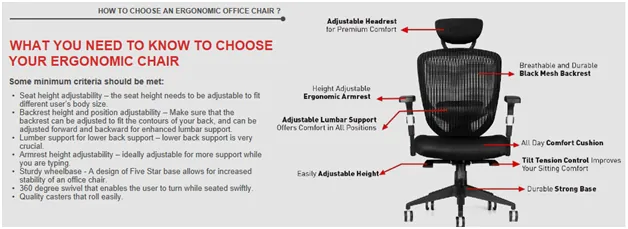
- Prioritize lumbar support that aligns with the natural inward curve of your lower spine.
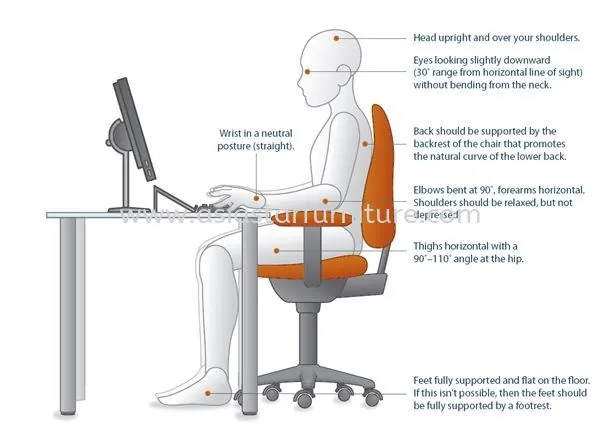
- Ensure your feet rest flat on the floor with your knees at a 90-degree angle.
- Look for adjustable armrests that prevent shoulder tension by supporting your forearms.
- Test the depth of the seat pan to ensure at least two inches of clearance behind your knees.
- Verify that the seat material provides adequate breathability to prevent heat buildup during long sessions.
How to Choose an Office Chair
Choosing the right seat involves evaluating how you interact with your workstation. You must prioritize dynamic adjustability over aesthetics. Start by measuring your desk height, as this dictates the range of motion required for your chair’s gas cylinder. If you’re tall or short, you need a chair with a seat slide feature to accommodate different thigh lengths.
Essential Ergonomic Features
| Feature | Function | Benefit |
|---|---|---|
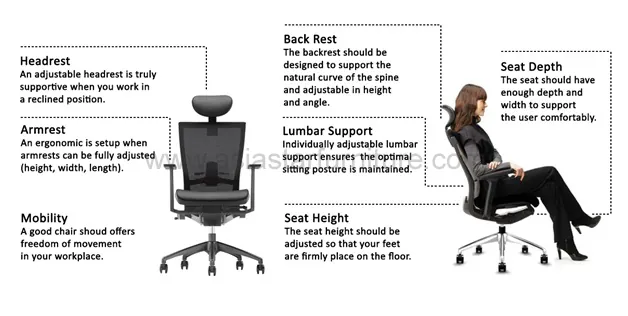
| Lumbar Support | Maintains spine curve | Reduces lower back pain |
| Seat Depth | Adjusts pan forward/back | Prevents pressure on knees |
| Armrest Height | Supports forearms | Relieves neck and shoulders |
| Tilt Tension | Controls recline resistance | Encourages micro-movements |
Assessing Your Physical Requirements
Your height and weight are the primary factors in selecting the correct frame size. Many manufacturers offer chairs specifically for “petite” or “big and tall” users. According to the Occupational Safety and Health Administration, maintaining a neutral body posture is essential for reducing the risk of work-related musculoskeletal disorders. If you feel restricted in a standard chair, you likely need a wider seat pan or a reinforced gas cylinder rated for higher weight capacities.
Material and Build Quality
The fabric you choose impacts both comfort and maintenance. Mesh backings are popular for their breathability and airflow, making them ideal for warm environments. Upholstered foam seats offer a more traditional, cushioned feel but may require more frequent cleaning.
- Breathable mesh: Best for temperature control and modern aesthetics.
- High-density foam: Provides firm support and maintains shape over years.
- Top-grain leather: Durable and easy to wipe down, though prone to heat retention.
Understanding Adjustment Mechanisms
A chair is only as good as its ability to change shape. You should look for a “synchro-tilt” mechanism, which allows the seat and backrest to recline at a synchronized ratio. This keeps your feet on the floor while you lean back, ensuring you remain in a stable position. Tension control knobs are also vital, as they allow you to set the resistance of the recline based on your body weight.
Pro Tip: Always check the warranty length before purchasing; reputable manufacturers often provide 10 to 12 years of coverage on structural components and moving parts.
Common Chair Configurations
| Configuration | Best Use Case | Key Advantage |
|---|---|---|
| Task Chair | Small desks/cubicles | Compact and agile |
| Executive Chair | Large offices/meetings | High back and prestige |
| Drafting Chair | Standing desks/counters | Higher seat adjustment range |
Should You Buy Used or New?
Buying used can save money, but you risk missing out on the manufacturer’s warranty. If you choose a refurbished model, ensure the reconditioning process includes replacing the hydraulic gas lift, as this is the most common point of failure. New chairs offer the benefit of a clean, custom-configured product tailored exactly to your preference for color and fabric type.
Testing Before You Commit
If possible, visit a showroom to sit in the chair for at least 15 minutes. Most people make the mistake of sitting for only a few seconds, which is insufficient to determine if the lumbar pressure is correct. Pay attention to how the armrests interact with your desk; if they hit the edge of the desk, you’ll be forced into an awkward posture.
Warning: Avoid chairs that lack a seat depth adjustment if you’re shorter than 5’4″ or taller than 6’2″, as you’ll likely experience either circulation issues behind the knees or inadequate thigh support.
Troubleshooting Common Discomforts
- Back pain: Usually caused by a lack of adjustable lumbar support.
- Leg numbness: Often the result of a seat pan that’s too deep.
- Shoulder fatigue: Typically caused by armrests that are set too high.
- Neck strain: Usually caused by the monitor being at the wrong height.
Related guides
- 10 Best Full Body Massage Chair Picks for Your Home Comfort
- 10 Best Full Body Massage Chairs for Your Home Comfort
- My Honest Review: Office Desk Chair – 2026 Guide
Frequently Asked Questions
What is a seat pan depth adjustment?
A seat pan depth adjustment allows you to slide the cushion forward or backward. This is critical for ensuring that you have about two inches of space between the edge of the seat and the back of your knees. Without this, the seat may cut into your circulation or fail to support your thighs, leading to discomfort during extended periods of sitting.
How do I measure for my chair?
Measure the distance from the floor to the underside of your desk. Your chair must fit under the desk with your thighs comfortably positioned. Also, measure your inseam to ensure the chair’s lowest setting allows your feet to rest flat on the floor. If your feet dangle, you’ll need a footrest to maintain proper posture and blood circulation.
Do I really need a headrest?
A headrest is optional for most users but becomes valuable if you frequently recline while talking on the phone or reading. If you sit upright for most of your tasks, a headrest may actually push your head forward, causing neck tension. Only invest in a headrest if you intend to use the chair for relaxation as well as active work.
Are gaming chairs better than ergonomic chairs?
Gaming chairs often prioritize aesthetic “racing” designs over functional ergonomics. They frequently lack depth adjustment and proper lumbar contouring found in dedicated office task chairs. While they can be comfortable for short sessions, they rarely match the long-term health benefits of a high-quality office chair designed for eight-hour workdays.
How often should I replace my chair?
A high-quality chair should last between 7 and 12 years with daily use. You should consider replacement when the foam loses its resilience, the hydraulic cylinder sinks on its own, or the frame develops excessive wobbling that can’t be corrected by tightening the bolts. If you experience persistent aches, it’s time for an upgrade.
Your next step is to measure your current desk height and record your own height and weight, as these numbers will be your primary filters when browsing online catalogs or visiting a local showroom. Once you have those figures, prioritize chairs that offer at least four points of adjustment—height, depth, recline, and armrest position—to ensure you achieve a truly ergonomic setup.